
REPMGR高可用工具
1.概述
REPMGR (Replication Manager) 是一套用于管理UXDB服务器集群中的流复制和高可用性 (HA) 的工具。通过UXDB增强内置的流复制功能,简化了主从库的设置、监控、故障转移和手动切换操作。 集群包括一主两备或一主多备多个节点,当主节点发生故障时,备节点能够立即接管集群,对外提供服务。在切换过程中对用户是透明的。 REPMGR高可用集群搭建完成后,可以在主节点停止服务后将对外服务自动切换到备节点,并可以拉起主节点重新加入集群做为备节点提供服务。在备节点停止服务后也可以拉起备节点继续提供服务。 数据库服务器可以持续对外提供服务,包括发生意外情况后依然可以提供服务,可以通过高可用集群解决单机数据库会因意外而停止服务的情况。
2.原理
REPMGR是一套工具,用于管理UXDB服务器集群中的复制和故障转移。它通过程序增强了uxdb的内置复制功能,这些程序可以设置备用服务器,监视复制并执行管理任务,例如故障转移或切换操作。 故障转移时根据LSN、优先值、id值选择出一个最合适的备节点提升为主。先比较LSN值,LSN值大的成为主节点;当LSN值一样时比较优先值,优先值大的成为主节点;当LSN值和优先值都一样时,id值较小的会成为主节点。 REPMGR流复制管理工具对集群节点的管理是基于一个分布式的管理方式,有repmgr和repmgrd两个命令。
- REPMGR命令实现对集群节点的管理,如注册主/备节点、Clone节点,Promote节点,Follow节点以及Switchover操作等。
- REPMGRd命令用来启动repmgr系统的守护进程,用以对集群节点的监控。
3.依赖软件
4.REPMGR部署
高可用集群搭建完成后为客户端提供和单机无差别的服务,客户端通过IP和端口访问数据库。
4.1.准备环境
准备两个虚拟机,一主一备异步复制的环境。
以主节点IP为192.71.0.114,从节点IP为192.71.0.115为例。
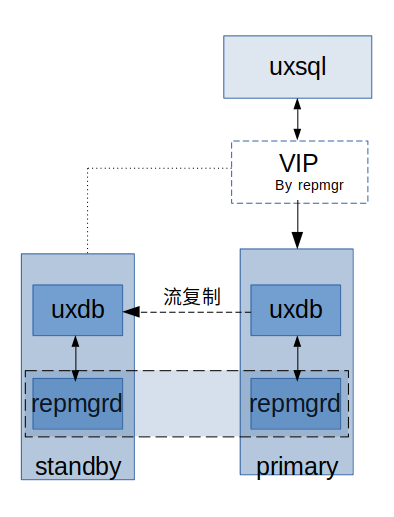
4.2.准备工作
在需要搭建REPMGR高可用集群的机器上,进行一些准备工作,包括网络配置、sudo权限、ssh配置等。
4.2.1.网络配置
配置网络环境,保证机器之间可以互相ping通,添加防火墙规则,允许访问。 centos上关闭防火墙,命令如下:
//查看防火墙状态
firewall-cmd --state
//关闭防火墙
systemctl stop firewalld
//禁止防火墙
systemctl disable firewalld
4.2.2.配置sudo免密码
虚拟IP功能中需要sudo命令免密码权限。
sudo vim /etc/sudoers
## Allow root to run any commands anywhere
# 允许 root 用户在任何地方执行任何命令
root    ALL=(ALL)       ALL
# 允许 uxdb 用户在任何地方执行任何命令,且无需输入密码
uxdb    ALL=(ALL)       NOPASSWD:ALL
# 重复条目(建议在实际配置文件中去重)
uxdb    ALL=(ALL)       NOPASSWD:ALL
4.2.3.ssh免密码
ssh免密操作如下所示(操作系统用户uxdb)。
- 在每个节点执行如下命令。
$ cd ~ 或 cd $ ssh-keygen -t rsa - 每个节点分别执行如下命令。
$ ssh-copy-id -i ~/.ssh/id_rsa.pub uxdb@192.71.0.114 $ ssh-copy-id -i ~/.ssh/id_rsa.pub uxdb@192.71.0.115 - 各自机器上,测试ssh登录另一机器。
//114机器 ssh 192.71.0.115 //115机器 ssh 192.71.0.114 - 验证成功后通过exit退出。
4.2.4.安装rsync
系统上需要安装rsync软件,centos的虚拟机上已安装好。
//检查是否安装过rsync,whereis rsync也可以
rpm -qa|grep rsync
//如果未安装,使用yum安装rsync
yum install rsync
4.3.配置主节点数据库
在主节点(192.71.0.114)机器上初始化集群,配置流复制等。
-
初始化集群。
./initdb -W -D datarep -
配置主节点uxsinodb.conf文件,仅列出修改的部分。 需要在uxdb目录下创建archive目录,用于归档日志。
mkdir /home/uxdb/archive修改数据库配置uxsinodb.conf文件。
cd /home/uxdb/uxdbinstall/dbsql/bin
vim datarep/uxsinodb.conf
各参数含义在配置文件中已有注释,需注意shared_preload_libraries,表示需预加载的插件,需在原配置内容后增加REPMGR,当前版本默认已包含orafce插件,配置后如下所示:
wal_level=replica
archive_mode=on
archive_command='cp %p /home/uxdb/archive/%f'
max_wal_senders=10
wal_keep_segments=512
hot_standby=on
shared_preload_libraries = 'orafce,repmgr'
full_page_writes = on
wal_log_hints=on
archive_mode=on时,业务繁忙产生的归档日志若和实例在一个磁盘,容易造成磁盘空间被快速侵占,请合理配置该参数。 注意
wal_keep_segments = 512 #2122以下版本采用该参数 wal_keep_size = 16GB #2122及以上版本采用该参数 -
配置主节点ux_hba.conf文件。 将以下配置加入ux_hba.conf文件,192.71.0.0视备库IP地址而修改, 192.71.0.0/24表示支持197.71.0.1~254间的IP访问,若需指定详细地址可按如下配置:192.71.0.115/32。
vim datarep/ux_hba.conflocal replication repmgr trust host replication repmgr 127.0.0.1/32 trust host replication repmgr 192.71.0.0/24 trust local repmgr repmgr trust host repmgr repmgr 127.0.0.1/32 trust host repmgr repmgr 192.71.0.0/24 trust# TYPE DATABASE USER ADDRESS METHOD # --- repmgr 高可用集群专用配置 --- # 允许 repmgr 用户通过本地 Unix 套接字或特定网络免密执行流复制和管理 local replication repmgr trust host replication repmgr 127.0.0.1/32 trust host replication repmgr 192.71.0.0/24 trust local repmgr repmgr trust host repmgr repmgr 127.0.0.1/32 trust host repmgr repmgr 192.71.0.0/24 trust # --- 基础访问控制配置 --- # 允许本地 Unix domain socket 连接 local all all md5 # IPv4 远程连接(允许所有地址通过 md5 密码验证) host all all 0.0.0.0/0 md5 # IPv6 远程连接 host all all ::1/128 md5 # --- 流复制权限配置 --- # 允许具有 replication 权限的用户从本地或本机 IP 连接 local replication all md5 host replication all 127.0.0.1/32 md5 host replication all ::1/128 md5注意 新增的repmgr用户的配置项,放在ux_hba.conf文件中的其他配置项的前面,否则使用repmgr用户建立连接的时候,会出现没有设置密码的错误。
[uxdb@song197:~/uxdbinstall/dbsql/bin]$ repmgr -f /home/uxdb/uxdbinstall/dbsql/bin/repmgr.conf primary register --force INFO: connecting to primary database... ERROR: connection to database failed DETAIL: fe_sendauth: no password supplied DETAIL: attempted to connect using: user=repmgr connect_timeout=2 dbname=repmgr host=192.71.0.197 fallback_application_name=repmgr -
创建REPMGR用户和数据库。
//启动数据库。 ./ux_ctl -D datarep/ -l logfile start //创建用户并输入超级用户密码,初始化时指定的密码 createuser -s repmgr //创建数据库并输入超级用户密码,初始化时指定的密码 createdb repmgr -O repmgr -
连接测试。 在192.71.0.115上连接192.71.0.114上的数据库。
uxsql 'host=192.71.0.114 user=repmgr dbname=repmgr connect_timeout=2'
4.4.配置主节点的REPMGR
-
安装REPMGR
安装步骤参见参见安装。
-
配置文件repmgr.conf
在数据库安装路径bin目录下创建repmgr.conf文件,并至少包含下面的配置,详细配置选项参见repmgr.conf参数配置。其中IP和数据目录等按照实际的数据库修改。priority表示在故障转移时候的优先级,优先级高的会被提升为主。
repmgr有三个默认文件路径,配置文件repmgr.conf只需要放在其中一个路径下,在bin目录下创建相当于第二个默认路径(./repmgr.conf)。
a. /home/uxdb/uxdbinstall/dbsql/conf/repmgr.conf
b. ./repmgr.conf
c. /etc/repmgr.conf
vim repmgr.confnode_id=1 node_name='node1' conninfo='host=192.71.0.114 user=repmgr dbname=repmgr connect_timeout=2 sql_exec_timeout=300' data_directory='/home/uxdb/uxdbinstall/dbsql/bin/datarep' ux_bindir='/home/uxdb/uxdbinstall/dbsql/bin' repmgr_bindir='/home/uxdb/uxdbinstall/dbsql/bin' failover=automatic priority=100 connection_check_type=ping reconnect_attempts=3 reconnect_interval=2 promote_command='repmgr -f /home/uxdb/uxdbinstall/dbsql/bin/repmgr.conf standby promote --log-to-file' follow_command='repmgr standby follow -f /home/uxdb/uxdbinstall/dbsql/bin/repmgr.conf --log-to-file --upstream-node-id=%n' monitoring_history=yes monitor_interval_secs=2 standby_disconnect_on_failover=true service_start_command = '/home/uxdb/uxdbinstall/dbsql/bin/ux_ctl -D /home/uxdb/uxdbinstall/dbsql/bin/datarep -l logfile start' service_stop_command = '/home/uxdb/uxdbinstall/dbsql/bin/ux_ctl -D /home/uxdb/uxdbinstall/dbsql/bin/datarep -l logfile stop' service_restart_command = '/home/uxdb/uxdbinstall/dbsql/bin/ux_ctl -D /home/uxdb/uxdbinstall/dbsql/bin/datarep -l logfile restart' service_reload_command = '/home/uxdb/uxdbinstall/dbsql/bin/ux_ctl -D /home/uxdb/uxdbinstall/dbsql/bin/datarep -l logfile reload' repmgrd_service_start_command = 'repmgrd -f /home/uxdb/uxdbinstall/dbsql/bin/repmgr.conf -d' repmgrd_service_stop_command = 'kill `cat /tmp/repmgrd.pid`' virtual_ip = '192.71.0.40/32' #虚拟IP地址,在配置虚拟IP之前,要确保该IP没有被使用 network_card = 'ens33' #本机网卡名称 check_brain_split=true #try_synchronous_connection_timeout=30 #同步模式切换为异步模式的最大等待时间 #root_password='' # linux系统下root用户密码 #uxdb_password='' # linux系统下uxdb用户密码如果配置的是同步模式,则数据库必须配置synchronous_standby_names参数,参见模式切换说明。 文件名、文件目录、文件大小和时间间隔均可由用户设置,用户配置之后需要重启repmgr才能生效。repmgr.conf文件指定参数示例:
repmgr_log_filename='ux_repmgr-%Y-%m-%d_%H%M%S.log' repmgr_log_directory='./ux_repmgrlog' repmgr_log_rotation_size='10MB' repmgr_log_rotation_age='1d' -
注册主节点
启动数据库服务器后可以进行主节点的注册。
a. 启动数据库。
./ux_ctl -D datarep/ startb. 注册主节点,必须通过-f指定配置文件的绝对路径,否则在主备切换时会出现异常。
repmgr -f /home/uxdb/uxdbinstall/dbsql/bin/repmgr.conf primary register --force
4.5.配置备节点的REPMGR
-
安装repmgr
安装步骤参见参见安装。
-
配置文件repmgr.conf
从主节点(在114机器上执行)复制一个repmgr.conf文件到从节点。
scp repmgr.conf uxdb@192.71.0.115:/home/uxdb/uxdbinstall/dbsql/bin/修改repmgr.conf,与从节点匹配(conninfo中是本机IP)。
node_id=2 node_name='node2' conninfo='host=192.71.0.115 user=repmgr dbname=repmgr connect_timeout=2 sql_exec_timeout=300' -
克隆数据库集群
在备节点上执行命令从主节点克隆数据库目录文件,IP是主节点的地址。
repmgr -h 192.71.0.114 -U repmgr -d repmgr -f /home/uxdb/uxdbinstall/dbsql/bin/repmgr.conf standby clone -
设置归档日志路径
在uxdb目录下创建archive目录,用于归档日志。
mkdir /home/uxdb/archive -
注册备节点
克隆完成后可以注册备节点了。
先启动备节点的数据库。
./ux_ctl -D datarep/ start注册备节点,必须通过-f指定配置文件的绝对路径,否则在主备切换时会出现异常。
repmgr -f /home/uxdb/uxdbinstall/dbsql/bin/repmgr.conf standby register
4.6.启动守护进程
在主节点(192.71.0.114)上启动守护进程。
repmgr daemon start -f /home/uxdb/uxdbinstall/dbsql/bin/repmgr.conf
在备节点(192.71.0.115)上启动守护进程。
repmgr daemon start -f /home/uxdb/uxdbinstall/dbsql/bin/repmgr.conf
4.7.查看集群信息
remgr高可用集群已搭建好,可以查看如下信息。
- 查看集群注册节点信息,可以看到两节点一主一备在正常运行。
repmgr -f /home/uxdb/uxdbinstall/dbsql/bin/repmgr.conf cluster show[uxdb@localhost bin]$ repmgr cluster show -f repmgr.conf DEBUG: connecting to: "user=repmgr connect_timeout=2 dbname=repmgr host=192.71.0.114 fallback_application_name=repmgr" DEBUG: connecting to: "user=repmgr connect_timeout=2 dbname=repmgr host=192.71.0.114 fallback_application_name=repmgr" DEBUG: connecting to: "user=repmgr connect_timeout=2 dbname=repmgr host=192.71.0.115 fallback_application_name=repmgr" ID | Name | Role | Status | Upstream | Location | Priority | Replication lag | Last replayed LSN ----+-------+---------+---------+----------+----------+----------+-----------------+------------------- 1 | node1 | primary | running | | default | 100 | n/a | 0/11008A80 2 | node2 | standby | running | node1 | default | 100 | 0 bytes | 0/11008A80 - 在主节点上执行命令ip addr,可以看到虚拟IP已绑定成功。下图中ens33下的 192.71.0.190就是虚拟IP。
[uxdb@localhost bin]$ ip addr 1: lo: <LOOPBACK,UP,LOWER_UP> mtu 65536 qdisc noqueue state UNKNOWN group default qlen 1000 link/loopback 00:00:00:00:00:00 brd 00:00:00:00:00:00 inet 127.0.0.1/8 scope host lo valid_lft forever preferred_lft forever inet6 ::1/128 scope host valid_lft forever preferred_lft forever 2: ens33: <BROADCAST,MULTICAST,UP,LOWER_UP> mtu 1500 qdisc pfifo_fast state UP group default qlen 1000 link/ether 00:50:56:2e:dd:f4 brd ff:ff:ff:ff:ff:ff inet 192.71.0.114/23 brd 192.71.1.255 scope global ens33 valid_lft forever preferred_lft forever inet 192.71.0.190/32 scope global ens33 valid_lft forever preferred_lft forever inet6 fe80::1c0f:a5a5:29c1:7c90/64 scope link valid_lft forever preferred_lft forever 3: virbr0: <NO-CARRIER,BROADCAST,MULTICAST,UP> mtu 1500 qdisc noqueue state DOWN group default qlen 1000 link/ether 52:54:00:fe:41:90 brd ff:ff:ff:ff:ff:ff inet 192.168.122.1/24 brd 192.168.122.255 scope global virbr0 valid_lft forever preferred_lft forever 4: virbr0-nic: <BROADCAST,MULTICAST> mtu 1500 qdisc pfifo_fast master virbr0 state DOWN group default qlen 1000 link/ether 52:54:00:fe:41:90 brd ff:ff:ff:ff:ff:ff - 可以在其它虚拟机上(uxdb版本一致)上通过虚拟IP连接到数据库。
./uxsql -h 192.71.0.190 -d uxdb
4.8.模式切换说明
配置主节点的数据目录下的uxsinodb.conf文件,增加两个配置就可以将异步改成同步。数据库节点的节点名,由repmgr.conf的node_name定义。
synchronous_standby_names = 'node2'
synchronous_commit = on
synchronous_standby_names说明如下所示。
- 一主一备场景下,synchronous_standby_names参数配置主备节点的node_name。
- 一主多备场景下,synchronous_standby_names参数配置为any1()。
参数值是any1()时,表示主节点收到1个备节点的反馈,就会给客户端返回事务执行成功。
注意
在配置同步或者异步之后,不建议在已经多次进行主备切换后,在当前环境直接通过修改配置文件修改同步或者异步,因为多次准备切换后有可能破坏了集群的配置,所以应该重新部署环境并配置各项参数,具体内容请参见repmgr部署。
注意
如果使用场景为配置同步之后,又想多次的主备切换测试,参数synchronous_standby_names应指定所有节点信息,且每个节点都需要配置,如:
synchronous_standby_names = 'node1,node2' - 同步模式切换异步模式 配置同步模式多次切换完成之后,如果想要在该环境上改成异步流复制模式,步骤如下:
- 异步模式切换同步模式 配置异步模式多次切换完成之后,如果想要在该环境上改成同步流复制模式,步骤如下:
4.9.配置多个备节点
重复备节点的步骤可以搭建一主多备集群。
- 在新的机器上配置与所有集群中所有机器的ssh互信、配置网络、sudo免密码。
- 安装同样版本的数据库。
- 配置文件repmgr.conf。
- 克隆数据库集群。
- 注册备节点。
4.10.REPMGR升级
- 升级前,先停止高可用集群上的repmgr守护进程(优先停止备节点守护进程),再停止数据库。
- 替换数据库bin目录下的repmgr、repmgrd,lib目录下的repmgr.so。
- 先启动数据库,再启动守护进程(优先启动主节点的守护进程)。
4.11.安全集群配置
4.11.1.REPMGR配置文件新增wal_encparms_path参数
配置流程:
-
主节点导出WAL加密参数。
使用uxsmo用户连接数据库导出。
select export_wal_encrypt_parameters();注意 导出函数可定义导出路径,缺省导出到实例目录下walencparms.file。
-
更改主节点配置repmgr.conf,追加wal_encparms_path参数。
wal_encparms_path='/home/uxdb/uxdbinstall/dbsql/bin/sec/walencparms.file' -
将主节点导出的WAL加密参数文件同步给各个备节点。
-
更改备节点配置repmgr.conf,追加wal_encparms_path参数。
wal_encparms_path='/home/uxdb/uxdbinstall/dbsql/bin/sec/walencparms.file' -
重启主节点、备节点repmge守护进程。
repmgr daemon stop -f /home/uxdb/uxdbinstall/dbsql/bin/repmgr.conf
repmgr daemon start -f /home/uxdb/uxdbinstall/dbsql/bin/repmgr.conf
注意 备库中的wallet加密文件需要使用和主库一样的wallet加密文件,即从主库中复制。
4.11.2.示例
-
环境部署 主机 192.72.0.240 备机 192.72.0.239 Vip 192.72.0.238
-
前期准备 省略关闭防火墙、sudo/ssh免密和rsync安装操作。
-
配置主节点数据库 ``` 初始化安全集群
[uxdb@uxdb2 bin]$ ./initdb -W -D sec -a创建归档目录
[uxdb@uxdb2 bin]$ mkdir /home/uxdb/archive配置主节点uxsinodb.conf和ux_hba.conf文件
[uxdb@uxdb2 bin]$ vi sec/uxsinodb.conf wal_level=replica archive_mode=on archive_command='cp %p /home/uxdb/archive/%f' max_wal_senders=10 wal_keep_segments=512 hot_standby=on shared_preload_libraries = 'repmgr' full_page_writes = on wal_log_hints=on [uxdb@uxdb2 bin]$ vi sec/ux_hba.conf local replication uxsmo trust host replication uxsmo 127.0.0.1/32 trust host replication uxsmo 192.72.0.0/24 trust local uxdb uxsmo trust host uxdb uxsmo 127.0.0.1/32 trust host uxdb uxsmo 192.72.0.0/24 trust 启动数据库、连接测试 [uxdb@uxdb2 bin]$ ./ux_ctl -D sec start [uxdb@uxdb2 bin]$ ./uxsql 'host=192.72.0.240 user=uxsmo dbname=uxdb connect_timeout=2' 导出wal加密参数 uxdb=> select export_wal_encrypt_parameters(); export_wal_encrypt_parameters ------------------------------- t (1 row) -
配置主节点的REPMGR
配置repmgr.conf文件 [uxdb@uxdb2 bin]$ vi repmgr.conf node_id=1 node_name='node1' conninfo='host=192.72.0.240 user=uxsmo dbname=uxdb connect_timeout=2 sql_exec_timeout=300' data_directory='/home/uxdb/uxdbinstall/dbsql/bin/sec' ux_bindir='/home/uxdb/uxdbinstall/dbsql/bin' repmgr_bindir='/home/uxdb/uxdbinstall/dbsql/bin' failover=automatic priority=100 connection_check_type=ping reconnect_attempts=3 reconnect_interval=2 promote_command='repmgr -f /home/uxdb/uxdbinstall/dbsql/bin/repmgr.conf standby promote --log-to-file' follow_command='repmgr standby follow -f /home/uxdb/uxdbinstall/dbsql/bin/repmgr.conf --log-to-file --upstream-node-id=%n' monitoring_history=yes monitor_interval_secs=2 standby_disconnect_on_failover=true service_start_command = '/home/uxdb/uxdbinstall/dbsql/bin/ux_ctl -D /home/uxdb/uxdbinstall/dbsql/bin/sec -l logfile start' service_stop_command = '/home/uxdb/uxdbinstall/dbsql/bin/ux_ctl -D /home/uxdb/uxdbinstall/dbsql/bin/sec -l logfile stop' service_restart_command = '/home/uxdb/uxdbinstall/dbsql/bin/ux_ctl -D /home/uxdb/uxdbinstall/dbsql/bin/sec -l logfile restart' service_reload_command = '/home/uxdb/uxdbinstall/dbsql/bin/ux_ctl -D /home/uxdb/uxdbinstall/dbsql/bin/sec -l logfile reload' repmgrd_service_start_command = 'repmgrd -f /home/uxdb/uxdbinstall/dbsql/bin/repmgr.conf -d' repmgrd_service_stop_command = 'kill `cat /tmp/repmgrd.pid`' virtual_ip = '192.72.0.238/32' network_card = 'ens33' check_brain_split=true wal_encparms_path='/home/uxdb/uxdbinstall/dbsql/bin/sec/walencparms.file' 注册主节点 [uxdb@uxdb2 bin]$ repmgr -f /home/uxdb/uxdbinstall/dbsql/bin/repmgr.conf primary register --force INFO: connecting to primary database... NOTICE: attempting to install extension "repmgr" NOTICE: "repmgr" extension successfully installed NOTICE: get vip command sudo ip addr show dev ens33|grep "192.72.0.238/32" NOTICE: primary node record (id: 1) registered -
配置备节点的repmgr
配置repmgr.conf文件 [uxdb@uxdb1 bin]$ vi repmgr.conf node_id=2 node_name='node2' conninfo='host=192.72.0.239 user=uxsmo dbname=uxdb connect_timeout=2 sql_exec_timeout=300' data_directory='/home/uxdb/uxdbinstall/dbsql/bin/sec' ux_bindir='/home/uxdb/uxdbinstall/dbsql/bin' repmgr_bindir='/home/uxdb/uxdbinstall/dbsql/bin' failover=automatic priority=100 connection_check_type=ping reconnect_attempts=3 reconnect_interval=2 promote_command='repmgr -f /home/uxdb/uxdbinstall/dbsql/bin/repmgr.conf standby promote --log-to-file' follow_command='repmgr standby follow -f /home/uxdb/uxdbinstall/dbsql/bin/repmgr.conf --log-to-file --upstream-node-id=%n' monitoring_history=yes monitor_interval_secs=2 standby_disconnect_on_failover=true service_start_command = '/home/uxdb/uxdbinstall/dbsql/bin/ux_ctl -D /home/uxdb/uxdbinstall/dbsql/bin/sec -l logfile start' service_stop_command = '/home/uxdb/uxdbinstall/dbsql/bin/ux_ctl -D /home/uxdb/uxdbinstall/dbsql/bin/sec -l logfile stop' service_restart_command = '/home/uxdb/uxdbinstall/dbsql/bin/ux_ctl -D /home/uxdb/uxdbinstall/dbsql/bin/sec -l logfile restart' service_reload_command = '/home/uxdb/uxdbinstall/dbsql/bin/ux_ctl -D /home/uxdb/uxdbinstall/dbsql/bin/sec -l logfile reload' repmgrd_service_start_command = './repmgrd -f /home/uxdb/uxdbinstall/dbsql/bin/repmgr.conf -d' repmgrd_service_stop_command = 'kill `cat /tmp/repmgrd.pid`' virtual_ip = '192.72.0.238/32' network_card = 'ens33' check_brain_split=true wal_encparms_path='/home/uxdb/uxdbinstall/dbsql/bin/sec/walencparms.file' 克隆数据库集群 [uxdb@uxdb1 bin]$ repmgr -h 192.72.0.240 -U uxsmo -d uxdb -f /home/uxdb/uxdbinstall/dbsql/bin/repmgr.conf standby clone NOTICE: destination directory "/home/uxdb/uxdbinstall/dbsql/bin/sec" provided INFO: connecting to source node DETAIL: connection string is: host=192.72.0.240 user=uxsmo dbname=uxdb DETAIL: current installation size is 66 MB INFO: creating directory "/home/uxdb/uxdbinstall/dbsql/bin/sec"... NOTICE: starting backup (using ux_basebackup)... HINT: this may take some time; consider using the -c/--fast-checkpoint option INFO: executing: /home/uxdb/uxdbinstall/dbsql/bin/ux_basebackup -l "repmgr base backup" -D /home/uxdb/uxdbinstall/dbsql/bin/sec -h 192.72.0.240 -p 5432 -U uxsmo -X stream NOTICE: standby clone (using ux_basebackup) complete NOTICE: you can now start your UXsinoDB server HINT: for example: /home/uxdb/uxdbinstall/dbsql/bin/ux_ctl -D /home/uxdb/uxdbinstall/dbsql/bin/sec -l logfile start HINT: after starting the server, you need to register this standby with "repmgr standby register" 创建归档目录 [uxdb@uxdb1 bin]$ mkdir /home/uxdb/archive 启动数据库、连接测试 [uxdb@uxdb1 bin]$ ./ux_ctl -D sec/ start [uxdb@uxdb1 bin]$ ./uxsql 'host=192.72.0.240 user=uxsmo dbname=uxdb connect_timeout=2' 注册备节点 [uxdb@uxdb1 bin]$ repmgr -f /home/uxdb/uxdbinstall/dbsql/bin/repmgr.conf standby register INFO: connecting to local node "node2" (ID: 2) INFO: connecting to primary database WARNING: --upstream-node-id not supplied, assuming upstream node is primary (node ID 1) INFO: standby registration complete NOTICE: standby node "node2" (id: 2) successfully registered -
启动主节点repmgr进程
[uxdb@uxdb2 bin]$ repmgr daemon start -f /home/uxdb/uxdbinstall/dbsql/bin/repmgr.conf NOTICE: executing: "./repmgrd -f /home/uxdb/uxdbinstall/dbsql/bin/repmgr.conf -d" [2023-04-07 16:18:27] [NOTICE] redirecting logging output to "/home/uxdb/uxdbinstall/dbsql/bin/logrepmgrd.log" NOTICE: repmgrd was successfully started -
启动备节点repmgr进程
[uxdb@uxdb1 bin]$ repmgr daemon start -f /home/uxdb/uxdbinstall/dbsql/bin/repmgr.conf NOTICE: executing: "./repmgrd -f /home/uxdb/uxdbinstall/dbsql/bin/repmgr.conf -d" [2023-04-07 16:18:41] [NOTICE] redirecting logging output to "/home/uxdb/uxdbinstall/dbsql/bin/logrepmgrd.log" NOTICE: repmgrd was successfully started -
查看集群信息
主节点
[uxdb@uxdb2 bin]$ repmgr -f repmgr.conf node status
Node "node1":
  UXsinoDB version: 2.1.1.5D
  Total data size: 66 MB
  Conninfo: host=192.72.0.240 user=uxsmo dbname=uxdb connect_timeout=2
  Role: primary
  WAL archiving: enabled
  Archive command: cp %p /home/uxdb/archive/%f
  WALs pending archiving: 0 pending files
  Replication connections: 1 (of maximal 10)
  Replication slots: 0 physical (of maximal 10; 0 missing)
  Replication lag: n/a
备节点
[uxdb@uxdb1 bin]$ repmgr -f repmgr.conf node status Node "node2": UXsinoDB version: 2.1.1.5D Total data size: 66 MB Conninfo: host=192.72.0.239 user=uxsmo dbname=uxdb connect_timeout=2 Role: standby WAL archiving: disabled (on standbys "archive_mode" must be set to "always" to be effective) Archive command: cp %p /home/uxdb/archive/%f WALs pending archiving: 0 pending files Replication connections: 0 (of maximal 10) Replication slots: 0 physical (of maximal 10; 0 missing) Upstream node: node1 (ID: 1) Replication lag: 0 seconds Last received LSN: 0/3015AB8 Last replayed LSN: 0/3015AB8 [uxdb@uxdb2 bin]$ repmgr daemon status ID | Name | Role | Priority | Status | repmgrd | PID | Paused? | Upstream last seen ----+-------+---------+----------+---------+---------+-------+---------+-------------------- 1 | node1 | primary | 100 | running | running | 16794 | no | n/a 2 | node2 | standby | 100 | running | running | 46295 | no | 0 second(s) ago -
主节点打开WAL加密,插入测试数据
[uxdb@uxdb2 bin]$ ./uxsql -U uxsmo -d uxdb uxdb=> alter system set wal_crypto = on; ALTER SYSTEM uxdb=> select ux_reload_conf(); ux_reload_conf ---------------- t (1 row) uxdb=> create table t1 (id text); CREATE TABLE uxdb=> insert into t1 values (111111111),(2222222222),(3333333333),(4444444444),(5555555555),(6666666666); INSERT 0 6 uxdb=> select * from t1; id ------------ 111111111 2222222222 3333333333 4444444444 5555555555 6666666666 (6 rows) -
备节点验证数据是否同步
[uxdb@uxdb1 bin]$ ./uxsql -U uxsmo -d uxdb uxdb=> select * from t1; id ------------ 111111111 2222222222 3333333333 4444444444 5555555555 6666666666 (6 rows) -
主节点异crash测试
Kill掉主节点master进程
[uxdb@uxdb2 bin]$ ps -ef|grep "uxdb -D"|grep -v grep
uxdb      12759      1  0 16:15 ?        00:00:01 /home/uxdb/uxdbinstall/dbsql/bin/uxdb -D sec
[uxdb@uxdb2 bin]$ kill -9 12759
查看主节点repmgr日志文件,ux_rewind操作执行成功
NOTICE: executing ux_rewind
DETAIL: ux_rewind command is "/home/uxdb/uxdbinstall/dbsql/bin/ux_rewind -D '/home/uxdb/uxdbinstall/dbsql/bin/sec' --source-server='host=192.72.0.239
user=uxsmo dbname=uxdb connect_timeout=2' --key-path='/home/uxdb/uxdbinstall/dbsql/bin/sec/walencparms.file'"
ux_rewind: servers diverged at WAL location 0/308A078 on timeline 1
ux_rewind: rewinding from last common checkpoint at 0/2000098 on timeline 1
ux_rewind: Done!
查看集群状态
节点1(140)成功降为备加入集群
[uxdb@uxdb2 bin]$ repmgr daemon status
 ID | Name  | Role    | Priority | Status  | repmgrd | PID   | Paused? | Upstream last seen
----+-------+---------+----------+---------+---------+-------+---------+--------------------
 1  | node1 | standby | 100      | running | running | 16794 | no      | 0 second(s) ago
 2  | node2 | primary | 100      | running | running | 46295 | no      | n/a
5.repmgr使用命令
repmgr有三个默认文件路径,当repmgr.conf文件在任意一个路径下时,下面的repmgr命令可以省略掉-f repmgr.conf参数。
- /home/uxdb/uxdbinstall/dbsql/conf/repmgr.conf
- ./repmgr.conf
- /etc/repmgr.conf
5.1.显示节点信息和复制状态
repmgr -f repmgr.conf node status
[uxdb@localhost bin]$ repmgr -f repmgr.conf node status
Node "node1":
    UXsinoDB version:         2.1.1.4
    Total data size:          67 MB
    Conninfo:                 host=192.71.0.114 port=5432 user=repmgr dbname=repmgr connect_timeout=2
    Role:                     primary
    WAL archiving:            enabled
    Archive command:          cp %p /home/uxdb/archive/%f
    WALs pending archiving:   0 pending files
    Replication connections:  0 (of maximal 10)
    Replication slots:        0 physical (of maximal 10; 0 missing)
    Replication lag:          n/a
5.2.显示集群注册节点信息
repmgr -f /home/uxdb/uxdbinstall/dbsql/bin/repmgr.conf cluster show
[uxdb@localhost bin]$ repmgr -f /home/uxdb/uxdbinstall/dbsql/bin/repmgr.conf cluster show
 ID | Name  | Role    | Status  | Upstream | Location | Priority | Replication lag | Last replayed LSN
----+-------+---------+---------+----------+----------+----------+-----------------+-------------------
 1  | node1 | primary | running |          | default  | 100      | n/a             | none
 2  | node2 | standby | running | node1    | default  | 100      | 0 bytes         | 0/706C488
5.3.查看守护进程状态
repmgr -f /home/uxdb/uxdbinstall/dbsql/bin/repmgr.conf daemon status
[uxdb@localhost bin]$ repmgr -f repmgr.conf daemon status
 ID | Name  | Role    | Priority | Status  | repmgrd     | PID | Paused? | Upstream last seen
----+-------+---------+----------+---------+-------------+-----+---------+--------------------
 2  | node2 | primary | 60       | running | not running | n/a | n/a     | n/a
 3  | node3 | standby | 90       | running | not running | n/a | n/a     | n/a
5.4.注册主节点
repmgr -f /home/uxdb/uxdbinstall/dbsql/bin/repmgr.conf primary register --force
[uxdb@localhost bin]$ repmgr -f /home/uxdb/uxdbinstall/dbsql/bin/repmgr.conf primary register --force
INFO: connecting to primary database...
DEBUG: connecting to: "user=repmgr connect_timeout=2 dbname=repmgr host=192.71.0.114 fallback_application_name=repmgr"
NOTICE: attempting to install extension "repmgr"
NOTICE: "repmgr" extension successfully installed
[sudo] uxdb 的密码:
NOTICE: primary node record (id:1) registered
[uxdb@localhost bin]$
5.5.注销主节点
可以在任何节点上运行,要注销的节点ID为--node-id。
repmgr primary unregister -f /home/uxdb/uxdbinstall/dbsql/bin/repmgr.conf --node-id=2
[uxdb@localhost bin]$ repmgr primary unregister -f repmgr.conf --node-id=2
INFO:node node2 (ID:2)was successfully unregistered
5.6.备节点克隆
repmgr -h 192.71.0.114 -U repmgr -d repmgr -f /home/uxdb/uxdbinstall/dbsql/bin/repmgr.conf standby clone
[uxdb@uxdev bin]$ repmgr -h 192.71.0.114 -U repmgr -d repmgr -f /home/uxdb/uxdbinstall/dbsql/bin/repmgr.conf standby clone
NOTICE: destination directory "/home/uxdb/uxdbinstall/dbsql/bin/datarep" provided
INFO: connecting to source node
DETAIL: connection string is: host=192.71.0.114 user=repmgr dbname=repmgr
DETAIL: current installation size is 67 MB
INFO: creating directory "/home/uxdb/uxdbinstall/dbsql/bin/datarep"...
NOTICE: starting backup (using ux_basebackup)...
HINT: this may take some time; consider using the -c/--fast-checkpoint option
INFO: executing ux_basebackup...
NOTICE: standby clone (using ux_basebackup) complete
NOTICE: you can now start your UXsinoDB server
HINT: for example: /home/uxdb/uxdbinstall/dbsql/bin/ux_ctl -D /home/uxdb/uxdbinstall/dbsql/bin/datarep -l logfile start
HINT: after starting the server, you need to register this standby with: "repmgr standby register"
5.7.注册备节点
repmgr -f /home/uxdb/uxdbinstall/dbsql/bin/repmgr.conf standby register
[uxdb@localhost bin]$ repmgr -f ./repmgr.conf standby register
INFO: connecting to local node "node2" (ID: 2)
INFO: connecting to primary database
WARNING: --upstream-node-id not supplied, assuming upstream node is primary (node ID 3)
INFO: standby registration complete
NOTICE: standby node "node2" (id: 2) successfully registered
5.8.注销备节点
//在本节点上注销
repmgr standby unregister -f  /home/uxdb/uxdbinstall/dbsql/bin/repmgr.conf
//在其它节点上注销
repmgr standby unregister -f  /home/uxdb/uxdbinstall/dbsql/bin/repmgr.conf --node-id=3
5.9.rejoin
把一个节点以备节点的身份重新加入集群。 需要先关闭当前节点的数据库服务,在节点(挂掉且已有备节点升为主)执行,host的IP是已提升为主节点的IP。
repmgr -d 'host=192.71.0.115 user=repmgr dbname=repmgr connect_timeout=2' node rejoin --force-rewind -f /home/uxdb/uxdbinstall/dbsql/bin/repmgr.conf
5.10.手动切换主从节点
在需要升为主的备节点上执行命令:
repmgr -f /home/uxdb/uxdbinstall/dbsql/bin/repmgr.conf standby switchover
NOTICE:STANDBY SWITCHOVER has completed successfully
注意 一主多备集群,在切换主节点的时候要添加--siblings-follow参数,将其他备节点跟随到新的主节点上。执行如下命令。
repmgr -f /home/uxdb/uxdbinstall/dbsql/bin/repmgr.conf standby switchover --siblings-follow
5.11.启动和停止守护进程
- 在repmgr.conf文件里配置repmgrd_service_start_command和repmgrd_service_stop_command的命令。
repmgrd_service_start_command='repmgrd -f /home/uxdb/uxdbinstall/dbsql/bin/repmgr.conf -d'
repmgrd_service_stop_command='kill cat /tmp/repmgrd.pid'
# Used by "repmgr daemon (start|stop)" to control repmgrd # repmgrd_service_start_command = 'repmgrd -f /home/uxdb/uxdbinstall/dbsql/bin/repmgr.conf -d' repmgrd_service_stop_command = 'kill $(cat /tmp/repmgrd.pid)' - 启动守护进程。
repmgr daemon start -f /home/uxdb/uxdbinstall/dbsql/bin/repmgr.conf - 停止守护进程。
repmgr daemon stop -f /home/uxdb/uxdbinstall/dbsql/bin/repmgr.conf[uxdb@localhost bin]$ repmgr daemon start -f repmgr.conf NOTICE: executing: "repmgrd -f /home/uxdb/uxdbinstall/dbsql/bin/repmgr.conf -d" [2026-10-16 16:18:01] [NOTICE] redirecting logging output to "/home/uxdb/uxdbinstall/dbsql/bin/repmgrd.log" NOTICE: repmgrd was successfully started
5.12.解绑vip
解绑vip,执行如下命令。
sudo ip addr del 10.1.108.204 dev ens33
10.1.108.204为虚拟IP,ens33为网卡名,可通过ifconfig或ip addr命令确认。
6.高可用场景示例
6.1.一主一备
主要是针对一主一备在异步流复制的情况下的异常处理。 假设主库地址192.71.0.114,备库地址192.71.0.115,虚拟IP为192.71.0.190,主备库关系和状态如图所示:
[uxdb@localhost bin]$ repmgr cluster show
 ID | Name  | Role    | Status  | Upstream | Location | Priority | Replication lag | Last replayed LSN
----+-------+---------+---------+----------+----------+----------+-----------------+-------------------
 1  | node1 | primary | running |          | default  | 100      | n/a             | none
 2  | node2 | standby | running | node1    | default  | 100      | 0 bytes         | 0/786C408
[uxdb@localhost bin]$ repmgr daemon status
 ID | Name  | Role    | Priority | Status  | repmgrd |  PID  | Paused? | Upstream last seen
----+-------+---------+----------+---------+---------+-------+---------+--------------------
 1  | node1 | primary | 100      | running | running | 15887 | no      | n/a
 2  | node2 | standby | 100      | running | running | 22939 | no      | 1 second(s) ago
6.1.1.主库异常
模拟主库异常关闭,例如执行kill -9 (主库PID)。 查看主库进程ID,并关闭进程。
ps -ef|grep uxdb
Kill -9 2379
[uxdb@localhost bin]$ ps -ef | grep uxdb
uxdb  2379     1  0 09:49 ?  00:00:00 /home/uxdb/uxdbinstall/dbsql/bin/uxdb -D /home/uxdb/uxdbinstall/dbsql/bin/datarep
uxdb  2380  2379  0 09:49 ?  00:00:00 uxdb: logger
uxdb  2382  2379  0 09:49 ?  00:00:00 uxdb: checkpointer
uxdb  2383  2379  0 09:49 ?  00:00:00 uxdb: background writer
uxdb  2384  2379  0 09:49 ?  00:00:00 uxdb: stats collector
uxdb  2238     1  0 Nov21 ?  00:00:00 /usr/bin/gnome-keyring-daemon ...
uxdb  2262  2229  0 Nov21 ?  00:00:01 /usr/libexec/gnome-session-binary ...
uxdb  2397  2262  0 Nov21 ?  00:00:03 /usr/bin/ssh-agent ...
主库异常关闭后,备库自动提升为主库,虚拟IP漂移绑定到新主库上。
[uxdb@uxdev bin]$ repmgr cluster show
 ID | Name  | Role    | Status  | Upstream | Location | Priority | Replication lag | Last replayed LSN
----+-------+---------+---------+----------+----------+----------+-----------------+-------------------
 1  | node1 | standby | running | node2    | default  | 100      | 0 bytes         | 0/C001868
 2  | node2 | primary | running |          | default  | 100      | n/a             | none
[uxdb@uxdev bin]$ ip addr
1: lo: <LOOPBACK,UP,LOWER_UP> mtu 65536 qdisc noqueue state UNKNOWN group default qlen 1000
    link/loopback 00:00:00:00:00:00 brd 00:00:00:00:00:00
    inet 127.0.0.1/8 scope host lo
       valid_lft forever preferred_lft forever
2: ens33: <BROADCAST,MULTICAST,UP,LOWER_UP> mtu 1500 qdisc fq_codel state UP group default qlen 1000
    link/ether 00:0c:29:1d:89:44 brd ff:ff:ff:ff:ff:ff
    inet 192.71.0.115/23 brd 192.71.1.255 scope global noprefixroute ens33
       valid_lft forever preferred_lft forever
    # VIP 地址已成功漂移至此节点 (node2)
    inet 192.71.0.190/32 scope global ens33
       valid_lft forever preferred_lft forever
3: virbr0: <NO-CARRIER,BROADCAST,MULTICAST,UP> mtu 1500 qdisc noqueue state DOWN group default qlen 1000
    link/ether 52:54:0
原主库自动同步新主库数据,成为新主库的新备库。
NOTICE: ux_rewind execution required for this node to attach to rejoin target node 2
DETAIL: rejoin target server's timeline 52 forked off current database system timeline 51 before current recovery point 0/2B000028
NOTICE: executing ux_rewind
DETAIL: ux_rewind command is "/home/uxdb/uxdbinstall/dbsql/bin/ux_rewind -D '/home/uxdb/uxdbinstall/dbsql/bin/datarep' --source-server='host=192.71.0.115 port=5432 user=repmgr dbname=repmgr connect_timeout=2'"
ux_rewind: servers diverged at WAL location 0/2A07F7B8 on timeline 51
ux_rewind: rewinding from last common checkpoint at 0/2A070A08 on timeline 51
ux_rewind: Done!
NOTICE: 0 files copied to /home/uxdb/uxdbinstall/dbsql/bin/datarep
NOTICE: setting node 1's upstream to node 2
WARNING: unable to ping "host=192.71.0.114 port=5432 user=repmgr dbname=repmgr connect_timeout=2"
DETAIL: UXSQLping() returned "UXSQLPING_NO_RESPONSE"
NOTICE: starting server using "/home/uxdb/uxdbinstall/dbsql/bin/ux_ctl -D /home/uxdb/uxdbinstall/dbsql/bin/datarep -l logfile start"
NOTICE: NODE REJOIN successful
DETAIL: node 1 is now attached to node 2
[2021-11-24 14:59:10] [NOTICE] reconnected to node after 61 seconds, node is now a standby, switching to standby monitoring
[2021-11-24 14:59:10] [NOTICE] former primary has been restored as standby after 61 seconds, updating node record and resuming monitoring
INFO: set repmgrd pid(): provided pidfile is /tmp/repmgrd.pid
[2021-11-24 15:04:11] [INFO] node "node1" (node ID: 1) monitoring upstream node "node2" (node ID: 2) in normal state
[2021-11-24 15:04:11] [DETAIL] last monitoring statistics update was 2 seconds ago
6.1.2.备库异常
模拟备库stop,执行如下命令:
./ux_ctl -D datarep stop
备库自动同步主库数据,成为主库的备库,恢复原有的主备关系。
/# 1. 故障现场:执行命令报错
[uxdb@uxdev bin]$ repmgr cluster show
ERROR: connection to database failed
DETAIL: 备节点异常 (Could not connect to server: Connection refused)
        Is the server running on host "192.71.0.115" and accepting TCP/IP connections on port 5432?
DETAIL: attempted to connect using:
        user=repmgr
        connect_timeout=2
        dbname=repmgr
        host=192.71.0.115
        port=5432
        fallback_application_name=repmgr
/# 2. 恢复后状态:节点恢复正常 (节点名/角色已更正)
[uxdb@uxdev bin]$ repmgr cluster show
 ID | Name  | Role    | Status  | Upstream | Location | Priority | Replication lag | Last replayed LSN
----+-------+---------+---------+----------+----------+----------+-----------------+-------------------
 1  | node1 | primary | running |          | default  | 100      | n/a             | none
 2  | node2 | standby | running | node1    | default  | 100      | 12 kB           | 0/11002EF8
6.2.一主多备
假设主库地址192.71.0.114,备库1地址192.71.0.115,备库2地址192.71.0.116,虚拟IP为192.71.0.190,主备库关系和状态如图所示:
[uxdb@localhost bin]$ repmgr cluster show
 ID | Name  | Role    | Status  | Upstream | Location | Priority | Replication lag | Last replayed LSN
----+-------+---------+---------+----------+----------+----------+-----------------+-------------------
 1  | node1 | primary | running |          | default  | 100      | n/a             | none
 2  | node2 | standby | running | node1    | default  | 100      | 0 bytes         | 0/13003080
 3  | node3 | standby | running | node1    | default  | 100      | 0 bytes         | 0/13003080
6.2.1.主库异常
- 模拟主库所在的服务器断网,执行如下命令断网:
service network stop - 主库断网后,备库自动提升为主库,虚拟IP漂移绑定到新主库上。
# 执行命令:查看集群状态(故障发生后) [uxdb@uxdev bin]$ repmgr cluster show ID | Name | Role | Status | Upstream | Location | Priority | Replication lag | Last replayed LSN ----+-------+---------+---------+----------+----------+----------+-----------------+------------------- 1 | node1 | primary | failed | | default | 100 | n/a | none 2 | node2 | primary | running | | default | 180 | n/a | none 3 | node3 | standby | running | node2 | default | 100 | 0 bytes | 0/701FA68 WARNING: following issues were detected - unable to connect to node "node1" (ID: 1) [uxdb@uxdev bin]$ ip addr 1: lo: <LOOPBACK,UP,LOWER_UP> mtu 65536 qdisc noqueue state UNKNOWN group default qlen 1000 link/loopback 00:00:00:00:00:00 brd 00:00:00:00:00:00 inet 127.0.0.1/8 scope host lo 2: ens33: <BROADCAST,MULTICAST,UP,LOWER_UP> mtu 1500 qdisc mq state UP group default qlen 1000 link/ether 00:50:56:b3:7e:f7 brd ff:ff:ff:ff:ff:ff inet 192.71.0.115/23 brd 192.71.1.255 scope global noprefixroute ens33 inet 192.71.0.190/32 scope global ens33 valid_lft forever preferred_lft forever 3: virbr0: <NO-CARRIER,BROADCAST,MULTICAST,UP> mtu 1500 qdisc noqueue state DOWN group default qlen 1000 inet 192.168.122.1/24 brd 192.168.122.255 scope global virbr0 4: virbr0-nic: <BROADCAST,MULTICAST> mtu 1500 qdisc pfifo_fast master virbr0 state DOWN group default qlen 1000 link/ether 52:54:00:2f:ca:d9 brd ff:ff:ff:ff:ff:ff - 原主库故障恢复。
service network start - 原主库自动同步新主库数据,成为新主库的新备库。
[uxdb@uxdev bin]$ repmgr cluster show ID | Name | Role | Status | Upstream | Location | Priority | Replication lag | Last replayed LSN ----+-------+---------+---------+----------+----------+----------+-----------------+------------------- 1 | node1 | standby | running | node2 | default | 100 | 0 bytes | 0/7842640 2 | node2 | primary | running | | default | 100 | n/a | none 3 | node3 | standby | running | node2 | default | 100 | 0 bytes | 0/7842640 - 主库异常关闭,若想以备节点的身份重新加入集群,需先执行rejoin,不能直接启动数据库。
6.2.2.备库异常
查看主备关系及状态信息。
repmgr cluster show
[uxdb@uxdev bin]$ repmgr cluster show
 ID | Name  | Role    | Status  | Upstream | Location | Priority | Replication lag | Last replayed LSN
----+-------+---------+---------+----------+----------+----------+-----------------+-------------------
 1  | node1 | standby | running | node2    | default  | 100      | 0 bytes         | 0/7842640
 2  | node2 | primary | running |          | default  | 100      | n/a             | none
 3  | node3 | standby | running | node2    | default  | 100      | 0 bytes         | 0/7842640
模拟node3节点的备库异常关闭,例如执行kill -9 备库(PID)。 查看备库进程ID,并关闭进程。
ps -ef|grep uxdb
Kill -9 4241
uxdb  4241     1  0 21:45 ?  00:00:00 /home/uxdb/uxdbinstall/dbsql/bin/uxdb -D datarep
uxdb  4242  4241  0 21:45 ?  00:00:00 uxdb: logger
uxdb  4244  4241  0 21:45 ?  00:00:00 uxdb: checkpointer
uxdb  4245  4241  0 21:45 ?  00:00:00 uxdb: background writer
uxdb  4246  4241  0 21:45 ?  00:00:00 uxdb: stats collector
uxdb  4243  4241  0 21:45 ?  00:00:00 uxdb: startup recovering 0000000A0000000000000014
uxdb  4303  4241  0 21:47 ?  00:00:00 uxdb: walreceiver streaming 0/14003400
uxdb  3417  2259  0 21:00 ?  00:00:00 /usr/libexec/gvfsd-dnssd --spawner 1.4 /org/gtk/gvfs/exec
备库自动同步主库数据,成为主库的备库,恢复原有的主备关系。
[uxdb@uxdev bin]$ repmgr cluster show
 ID | Name  | Role    | Status  | Upstream | Location | Priority | Replication lag | Last replayed LSN
----+-------+---------+---------+----------+----------+----------+-----------------+-------------------
 1  | node1 | standby | running | node2    | default  | 100      | 0 bytes         | 0/786C408
 2  | node2 | primary | running |          | default  | 180      | n/a             | none
 3  | node3 | standby | failed  | node2    | default  | 100      | 112 MB          | 0/0
WARNING: following issues were detected
  - unable to connect to node "node3" (ID: 3)
[uxdb@uxdev bin]$ repmgr cluster show
 ID | Name  | Role    | Status  | Upstream | Location | Priority | Replication lag | Last replayed LSN
----+-------+---------+---------+----------+----------+----------+-----------------+-------------------
 1  | node1 | standby | running | node2    | default  | 100      | 0 bytes         | 0/797B730
 2  | node2 | primary | running |          | default  | 180      | n/a             | none
 3  | node3 | standby | running | node2    | default  | 100      | 0 bytes         | 0/797B730
7.附录
7.1.repmgr.conf参数配置
表 user_tables的列
| 参数分组 | 参数名 | 描述 | 是否有默认值 | 默认值 | 备注 |
| ----------------- | ------------------------------------ | ---------------------------- | ---------------- | ---------------------------------- | ------------------------------------------------------------ |
| 节点信息 | node_name | 节点名称 | 否 | | |
| | node_id | 节点 ID | 否 | | |
| | conninfo | 数据库连接信息 | 否 | | |
| | data_directory | 数据目录 | 否 | | |
| | config_directory | 配置文件目录 | 否 | | 当 uxsinodb.conf 不在实例目录下时指定其路径 |
| | ux_bindir | 数据库 bin 目录路径 | 否 | | |
| | repmgr_bindir | Repmgr 相关可执行程序路径 | 否 | | |
| | replication_user | 流复制的用户名 | 是 | 不指定时默认用 conninfo 中的用户 | |
| | replication_type | 流复制方式 | 是 | physical | 可选值: 'physical' 或 'bdr' |
| 日志相关 | log_level | 日志输出级别 | 是 | INFO | 可选: DEBUG, INFO, NOTICE, WARNING, ERROR, ALERT, CRIT, EMERG |
| | log_facility | 系统日志输出位置 | 是 | STDERR | 可选: LOCAL0-7, USER, STDERR |
| | repmgr_log_filename | repmgr 日志文件名 | 是 | repmgr-%Y-%m-%d_%H%M%S.log | |
| | repmgr_log_directory | repmgr 日志文件路径 | 是 | ./repmgrlog | |
| | repmgr_log_rotation_size | repmgr 日志分割大小 | 是 | 10MB | 支持单位: MB, KB |
| | repmgr_log_rotation_age | repmgr 日志分割生命周期 | 是 | 1d | 支持单位: d/day, h/hour, m/min |
| | log_status_interval | 日志状态更新间隔 (秒) | 是 | 300 | |
| 克隆备节点 | tablespace_mapping | 表空间目录映射 | 否 | | 格式: "source_dir=target_dir" |
| | restore_command | 节点恢复命令 | 否 | | 用于从 WAL 归档中恢复 |
| | archive_cleanup_command | 清理归档日志命令 | 否 | | |
| | recovery_min_apply_delay | 重放 WAL 日志的延迟时间 | 是 | 0 | 单位: 秒 |
| | use_replication_slots | 是否使用物理复制槽 | 是 | FALSE | |
| | use_primary_conninfo_password | 连接主节点时是否指定密码 | 是 | FALSE | |
| | ux_basebackup_options | 备份实例额外参数 | 否 | | |
| | passfile | 连接主节点时指定密码文件 | 否 | | |
| 备节点提升 | promote_check_timeout | 提升为主节点的超时时间 | 是 | 60 | 单位: 秒 |
| | promote_check_interval | 检查提升成功的间隔时间 | 是 | 1 | 单位: 秒 |
| 备节点 Follow | primary_follow_timeout | 连接主节点的超时时间 | 是 | 60 | 单位: 秒 |
| | standby_follow_timeout | 建立流复制关系的超时时间 | 是 | 15 | 单位: 秒 |
| 备节点切换 | shutdown_check_timeout | 等待降级节点停止的最大时间 | 是 | 60 | 单位: 秒 |
| | standby_reconnect_timeout | 意外断开后重连的超时时间 | 是 | 60 | 单位: 秒 |
| | wal_receive_check_timeout | 检查 WAL 接收进度的超时时间 | 是 | 30 | 单位: 秒 |
| 节点 Rejoin | node_rejoin_timeout | 重新加入集群的超时时间 | 是 | 60 | 单位: 秒 |
| 节点检查 | archive_ready_warning | 未归档警告阈值 (字节) | 是 | 16 | |
| | archive_ready_critical | 未归档临界阈值 (字节) | 是 | 128 | |
| | replication_lag_warning | 延迟警告阈值 (秒) | 是 | 300 | |
| | replication_lag_critical | 延迟临界阈值 (秒) | 是 | 600 | |
| 见证节点 | witness_sync_interval | 见证节点同步间隔 (秒) | 是 | 15 | |
| 守护进程 | location | 定义节点位置的字符串 | 是 | default | 用于故障转移时的节点检测 |
| | failover | 故障转移方式 | 是 | manual | manual, automatic |
| | priority | 节点的优先级 | 是 | 100 | 值越高越优先提升为主节点 |
| | connection_check_type | 连接检查类型 | 是 | ping | 可选: ping, query |
| | reconnect_attempts | 重连尝试次数 | 是 | 6 | |
| | reconnect_interval | 重连时间间隔 (秒) | 是 | 10 | |
| | promote_command | 提升为主节点的命令 | 否 | | |
| | follow_command | 变更跟随上级节点的命令 | 否 | | |
| | primary_notification_timeout | 提升新主节点前的等待时间 | 是 | 60 | |
| | repmgrd_standby_startup_timeout | 备节点连接超时时间 | 是 | 60 | 默认参考 standby_reconnect_timeout |
| | monitoring_history | 是否记录监控数据 | 是 | no | |
| | monitor_interval_secs | 监控间隔时间 (秒) | 是 | 2 | |
| | degraded_monitoring_timeout | 降级时监控超时时间 (秒) | 是 | -1 | |
| | async_query_timeout | 异步查询/断联超时时间 (秒) | 是 | 60 | 用于 query 检查模式 |
| | repmgrd_pid_file | repmgrd 进程 ID 文件路径 | 是 | /tmp | |
| | standby_disconnect_on_failover | 切换前是否断开备用 WAL 进程 | 是 | FALSE | |
| | sibling_nodes_disconnect_timeout | 兄弟节点断开超时时间 (秒) | 是 | 30 | |
| | failover_validation_command | 故障转移验证命令 | 否 | | |
| | election_rerun_interval | 重新选举的间隔时间 (秒) | 是 | 15 | |
| 守护进程服务 | repmgrd_service_start_command | repmgrd 服务启动命令 | 否 | | |
| | repmgrd_service_stop_command | repmgrd 服务停止命令 | 否 | | |
| 数据库服务 | service_start_command | 启动数据库命令 | 否 | | |
| | service_stop_command | 停止数据库命令 | 否 | | |
| | service_restart_command | 重启数据库命令 | 否 | | |
| | service_reload_command | 重载配置文件命令 | 否 | | |
| | service_promote_command | 将当前节点提升为主的命令 | 否 | | 仅应在主节点故障后运行 |
| | ux_ctl_options | ux_ctl 执行额外参数 | 否 | | |
| 事件通知 | event_notification_command | 外部获取 event 表数据的命令 | 否 | | |
| | event_notifications | 获取的事件类型 | 否 | | 参见事件类型定义 |
| 服务器相关 | root_password | 服务器 root 用户密码 | 否 | | |
| | uxdb_password | 数据库运行用户密码 | 否 | | |
| | rsync_options | rsync 同步额外参数 | 否 | | |
| | ssh_options | SSH 执行额外参数 | 是 | '-q -o ConnectTimeout=10' | |
| Barman 复制 | barman_server | Barman 服务器名称 | 否 | | 仅在使用 Barman 时设置 |
| | barman_host | Barman IP 或主机名 | 否 | | |
| | barman_config | Barman 配置文件路径 | 否 | | |
| BDR 设置 | bdr_local_monitoring_only | 是否仅本地监视 BDR 状态 | 是 | FALSE | |
| | bdr_recovery_timeout | BDR 节点恢复超时时间 (秒) | 是 | 30 | |
| VIP 相关 | virtual_ip | 虚拟 IP 地址 | 否 | | |
| | network_card | 虚拟 IP 绑定的网卡名称 | 否 | | |
| 磁盘相关 | device_check_timeout | 磁盘检查超时时间 (秒) | 是 | 60 | |
| | device_check_times | 磁盘检查次数 | 是 | 3 | |
| 超时配置 | standby_wait_timeout | 备节点连接主节点失败重试时间 | 是 | 10 | 单位: 分钟 |
| 主节点配置 | try_synchronous_connection_timeout | 尝试同步连接超时时间 (秒) | 是 | 30 | |
| | check_brain_split | 是否启用脑裂检测 | 是 | FALSE | 启用后自动降级以防多主冲突 |
| 安全加密 | wal_encparms_path | WAL 加密参数文件路径 | 否 | | 使用加密日志流时必须指定 |
事件类型如下所示。
- primary_register、primary_unregister
- standby_clone、standby_unregister、standby_promote、standby_failure、standby_recovery、standby_disconnect_manual、standby_register
- witness_register、witness_unregister
- repmgrd_start、repmgrd_shutdown、repmgrd_reload
- repmgrd_local_disconnect、repmgrd_local_reconnect、repmgrd_upstream_disconnect、repmgrd_standby_reconnect、repmgrd_upstream_reconnect
- repmgrd_config_reload
- repmgrd_failover_follow、repmgrd_failover_abort、repmgrd_failover_promote、repmgrd_failover_aborted、repmgrd_promote_error
- bdr_register、bdr_unregister、bdr_reconnect
- cluster_cleanup、cluster_created
- node_rejoin